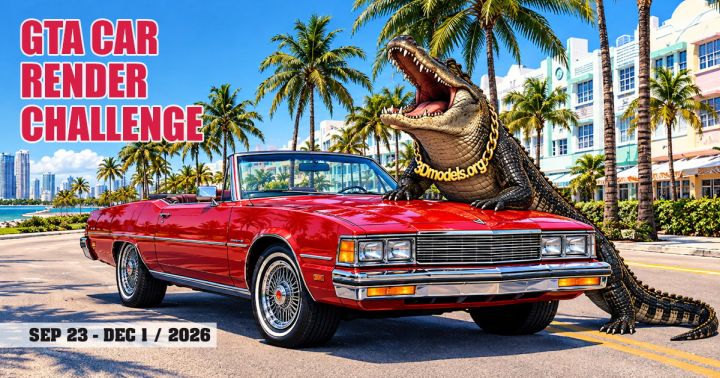
The largest automotive visualization competition in the CG industry is back. The 3DModels.org 12th Annual Car Render Challenge has officially launched, bringing together 3D generalists, hard-surface modelers, and look-dev artists from around the globe.
This year’s thematic backdrop centers on the world of GTA (Grand Theft Auto). With a jury composed of senior industry veterans and a prize pool packed with software licenses, render credits, and cash-equivalent store vouchers.
Check out the technical breakdown of the contest structure, mandatory asset requirements, submission criteria, judging metrics, and prize distribution.
Designing a vehicle for the world of GTA
The primary objective of the challenge is to design an original, custom 3D vehicle from scratch and place it within a fully realized, story-driven 3D environment.
While the theme draws inspiration from the GTA universe, artists have vast creative freedom regarding vehicle style and environment backdrop. It can range from creating a muscle car in coastal alleyway, a heavily modified vehicle under urban highway overpasses, or a rugged pickup traversing rural tracks.
Idea is yours.
Vehicle eligibility and restrictions
- Allowed primary subjects: Custom passenger cars, pickups, vans, light commercial trucks, and custom sports or muscle concepts.
- Prohibited primary subjects: Motorcycles, buses, semi-trucks, military tanks, and heavily armored combat vehicles cannot be used as the central focus (though secondary background vehicles are permitted).
- Multiple vehicles: You may feature more than one vehicle in the scene, provided the core subject is designed and modeled specifically for this competition.
Mandatory scene requirements and assets
To ensure fairness and verify that every entry is purpose-built for this event, 3DModels.org provides two specific 3D assets upon registration that must be incorporated directly into your final render.
1. The 3D alligator model
Every registered participant receives a dedicated 3D alligator asset.
You are required to integrate this alligator model visibly into your final 3D environment. Rather than treating it as an afterthought, the jury actively looks for creative storytelling. You need to give the alligator a functional, humorous, or atmospheric narrative role within the scene (e.g., lurking in a storm drain, sitting in the passenger seat, or posing on a swamp roadside).
2. The branded 3D plates
Participants also receive a set of custom branded assets, including vehicle license plates and environmental signage. You must place at least one of these provided plates within your scene, either mounted on your primary vehicle as a license plate or integrated into the surrounding environment as street/garage signage.
Asset usage policy: Both the alligator model and the branded plates are distributed strictly for use within your official competition entry. Utilizing these proprietary assets in outside commercial or personal projects is explicitly prohibited.
Strict production guidelines and Anti-AI rules
The 3DModels.org challenge maintains rigorous standards regarding asset provenance and production methodology. Submissions undergo careful inspection to ensure technical authenticity.
[ Registration & Asset Download ]
                │
                ▼
      [ Publish Public WIP Post ]
   (Must include required tag & web link)
                │
                ▼
[ 3D Vehicle Modeling & Environment Layout ]
     (No stock cars, photobashing, or AI)
                │
                ▼
      [ Integrate Gator & Branded Plate ]
                │
                ▼
     [ Final Lighting, Shading & Render ]
                │
                ▼
[ Submit: Final Render + Clay/Wireframe Pass ]
Mandatory Work-in-Progress (WIP) tracking
To prevent the use of pre-existing models or AI-generated imagery, every artist must maintain a public Work-in-Progress thread or post.
- Your initial WIP post must explicitly feature the tag: “Participant of the 3DModels.org GTA Car Render Challenge” accompanied by a live, clickable link to the official contest page.
- WIP updates can be posted on personal blogs, ArtStation, CGArchitect, or social media channels (private cloud drives and 3DModels.org internal forums do not qualify).
- The WIP thread must clearly showcase raw modeling progress, un-smoothed viewport wireframes, and progressive stage renders. Entries submitted without a verifiable WIP record will be disqualified.
Post-processing rules
- Generative AI tools are strictly forbidden across all stages of modeling, texturing, rendering, and post-production.
- The main vehicle must be modeled from scratch by you specifically for this contest. Stock models, repurposed personal archives, and 3D adaptations of existing concept art by other creators are forbidden.
- The scene background must be constructed in full 3D. While HDRI maps are permitted for sky domes and ambient illumination, single-color backgrounds, pure 2D photo backdrops, photobashing, and manual paint-overs are disallowed. Third-party environment props (vegetation, street furniture, characters) are permitted.
- Compositing render passes, color grading, depth-of-field, and atmospheric particle effects (smoke, dust, lens flares) are allowed during post-processing. However, adding photographic cutouts or 2D elements in post is prohibited.
Technical deliverables and specifications
When submitting your final entry through the official competition portal, ensure your files match the exact technical parameters:
Minimum resolution: 1500 pixels on the longest side (Horizontal or Vertical)
Maximum file size: 5 MB
Accepted rormats: JPG or PNG
Secondary render: 1x Clay or Wireframe render of the full scene (required for verification)
Text deliverables: Final image title, list of software tools used, and a short background story
Watermarks & logos: Subtle signature/title in a corner is allowed; no commercial logos, emails, or phone numbers
The new dedicated Animation category
For the first time in the competition’s history, a dedicated Animation category has been introduced to highlight motion graphics, cinematic camera work, and dynamic look-development.
Rules are as follows.
- Participation in the Animation Category is optional, but you must submit a complete still render as your primary contest entry to be eligible.
- The animation must not exceed 30 seconds in length.
- The clip must feature the exact same car and 3D environment as your still render entry. Workflow timelapses, viewport screen captures, and AI-assisted camera paths or motion-capture data are rejected.
- Videos must be uploaded to YouTube or Vimeo at a minimum resolution of 1080p and linked within the submission form.
Judging panel and evaluation criteria
Entries are evaluated by an esteemed panel of 3D industry veterans, studio directors, software developers, and CG publication editors, including representatives from Evermotion, iRender, Chaos Corona, CGBoost, Gnomon, Rizom-Lab, and Creative Shrimp.
Scoring system
Each judge independently selects their top five submissions, assigning points on a descending scale:
- 1st place pick: 5 Points
- 2nd place pick: 4 Points
- 3rd place pick: 3 Points
- 4th place pick: 2 Points
- 5th place pick: 1 Point
The points across all judges are tallied to determine the final leaderboard.
Key evaluation criteria
- Visual appeal & mood: Overall aesthetic impact, lighting cohesion, color harmony, and composition.
- Concept originality & storytelling: The ability of the vehicle and environment to evoke a narrative within the GTA theme.
- Technical complexity: Detail density, polycount management, topology cleanliness, shading networks, and realistic material response.
- Scene execution quality: Seamless integration of environmental elements, character props, and mandatory assets (alligator and branded plates).
Breakdown of prizes and awards
The competition offers substantial hardware support, cloud rendering allocations, and perpetual software licenses across multiple placement categories.
1st place winner
- 3DModels.org: $1,000 Store Credit
- iRender: $1,000 Render Points + 1-Year Double Credits Bonus
Software licenses
- 1-Year Marmoset Toolbag Individual License
- 1-Year Cascadeur Pro License
- 2-Year Polygonflow Dash License
- RizomUV Perpetual License
- World Creator Professional License
- HDR Light Studio Pro (Node-Locked)
- TopoGun Perpetual License
- Shapelab Max (PCVR) & Shapelab Lite
- Silo & Milo latest suite + 1-Year Updates
- PixPlant 5 for Windows
- VideoCopilot Ultra Studio Bundle
- Full C4Dzone Plugins Suite for Cinema4D & Octane
Training & subscriptions
- 1-Year Gnomon Workshop Subscription
- 3-Month Evermotion Indie Subscription
- 400 RebusFarm RenderPoints
2nd place winner
- 3DModels.org: $500 Store Credit
- iRender: $500 Render Points + 1-Year Double Credits Bonus
- Software licenses & credits: 1-Year Licenses for Marmoset Toolbag, Cascadeur (Indie), Polygonflow Dash; RizomUV Perpetual; World Creator Pro; HDR Light Studio Pro; TopoGun; VideoCopilot Motion Design Bundle; PixPlant 5; C4Dzone Suite; 300 RebusFarm RenderPoints.
- Training: 6-Month Gnomon Workshop Subscription, 3-Month Evermotion Indie Subscription.
3rd place winner
- 3DModels.org: $250 Store Credit
- iRender: $200 Render Points + 1-Year Double Credits Bonus
- Software licenses & credits: 1-Year Marmoset Toolbag, 1-Year Cascadeur Indie, 6-Month Polygonflow Dash, RizomUV Perpetual, World Creator Pro, HDR Light Studio Pro, TopoGun, VideoCopilot Light Bundle, PixPlant 5, 200 RebusFarm RenderPoints.
- Training: 3-Month Gnomon Workshop Subscription, 3-Month Evermotion Indie Subscription.
Animation category & special awards
- Best Animation award: $100 3DModels.org Store Credit, $500 iRender Render Points, 1-Year Cascadeur Pro, 1-Year Marmoset Toolbag, 200 RebusFarm Points, plus perpetual licenses for PixPlant 5, Shapelab, and FrameRef.
- Most active WIP thread: $100 3DModels.org Store Credit for community engagement and workflow documentation.
- Nevercenter team favorite: Complete Nevercenter Creative Suite (Silo, Milo, Pixelmash, CameraBag Pro).
Perks for all participants
Simply completing the registration form unlocks immediate participant perks, including $50 in free iRender points, temporary full access to Polygonflow Dash and FrameRef during the competition window, a 40% bonus on RebusFarm credits, and substantial discount vouchers for The Gnomon Workshop, Marmoset Toolbag, and Shapelab VR.
How to participate in 3dmodel.org competition?
- Visit the official portal at 3DModels.org to request your participant kit containing the 3D alligator and branded plate files.
- Create a public post on your chosen platform, insert the required participation tag and contest link, and outline your preliminary vehicle concepts.
- Establish your vehicle silhouetting, main camera focal lengths, and scene block-out early to verify lighting and asset placement before diving into high-poly modeling.