Foundry has officially released SmartRoto, a new AI VFX rotoscoping plugin designed specifically for Nuke, NukeX, Nuke Studio, and Nuke Indie. Announced in mid-July 2026, this tool targets one of the most time-consuming tasks in visual effects: rotoscoping.
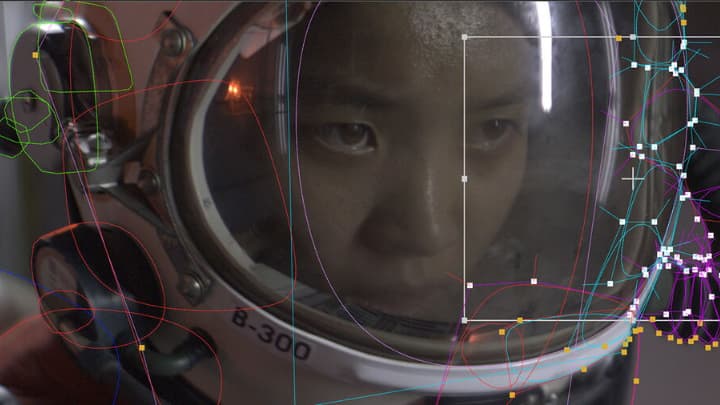
Instead of generating rigid pixel-based masks, SmartRoto works inside Nuke’s native Roto node. It intelligently deforms artist created roto splines across sequences while keeping full creative control in the artist’s hands.
Claimed to deliver up to 4x faster results compared to pure manual roto, SmartRoto aims to eliminate the repetitive manual without forcing artists to leave from Nuke software. The goal is not to replace VFX artist, but to speed up the post production pipeline.
What is SmartRoto in Nuke?
If we talk about the core technical architecture, SmartRoto uses a custom machine-learning model trained exclusively on licensed data over approximately four years of internal research (after earlier academic collaborations with DNEG and the University of Bath proved insufficient).
ML based SmartRoto does not rely on optical flow or image segmentation. Instead, it:
- Works onto image features around the artist’s drawn shapes
- Uses the spatial relationships between multiple shapes as constraints
- Edits the actual spline control points forward and backward in time
- Local processing only (no footage leaves the workstation)
- Sub-pixel accuracy retained throughout the pipeline
The system does not rely on optical flow or segmentation masks. Instead, it analyses image features around the artist’s drawn roto shapes and uses the spatial relationships between multiple shapes as geometric constraints. This design is the reason why breaking a subject into properly articulated shapes remains essential, A single large silhouette almost always performs worse than several interlocking shapes.
It is compatibility with existing Roto node features such as feather, lifetime, and motion blur.
Keyframe system: User Keys vs Smart Keys
This is one of the most important technical details of SmartRoto tool. This dual system is what allows the tool to stay firmly under the artist’s control instead of becoming a black-box generator.
This AI VFX rotoscoping plugin works per shape rather than per frame. On any given frame you can lock some shapes as user keys while allowing others to remain smart keys. When you correct a smart key, it is immediately promoted to a user key and the model re-solves the surrounding range using the new information. A built-in thinning tool can later reduce unnecessary key density where interpolation is sufficient.
So, in a nutshell, it uses the best of both the worlds – artistic as well as AI model based.
| Keyframe type | Created by | Behavior | Overwritable |
| User key | VFX Artist | Treated as the base for AI based roto | No |
| Smart key | AI system of SmartRoto | Generated between user keys | Yes |
Recommended pipeline to use SmartRoto
The intended post production workflow mostly follows the way experienced roto artists already work. You still make the critical artistic decisions about shape breakdown, SmartRoto only accelerates the subsequent animation of those shapes.
- Select a clean, fully visible, uncluttered frame and build articulated shapes.
- Jump to a frame with significant pose or silhouette change and generate a Smart Key.
- Evaluate the prediction, correct any points that need adjustment, and convert the frame to a User Key.
- Repeat this process for a few strategically chosen frames that capture the extremes of motion.
- Define the working range (Input, Custom, or In/Out points).
- Run the Roto Range / Create Smart Keys command across the sequence.
- Scrub through the result, correct problem frames (each correction becomes a new user key), and re-solve only the affected ranges.
- Use the thinning tool if the dense key set becomes difficult to manage.
You are free to jump non-sequentially through the timeline. There is no requirement to work strictly left-to-right.
Claimed performance improvements from Foundry
Early internal testing and beta feedback show clear speed gains, but the results vary depending on the nature of the shot. These are mostly based on Foundry’s two-week artist tests.
The major claims for SmartRoto tool are as follows.
- Consistently 2× faster on typical production shots; peaks of ~4× on favourable material.
- Solid handling of moderate motion blur (edges tend to settle in the middle of the blur).
- Reasonable performance on partial occlusion.
- Robust identity tracking when subjects have distinct visual features.
- Full compatibility with downstream vector-based workflows.
Current limitations of Foundry’s AI based SmartRoto node
But natural, it has to be there. But, the technical and management team is continuously working to reduce them. All these are officially tested on Nuke 16.1 and 17.0.
- Heavily motion-blurred frames or extreme silhouette changes usually require additional user keys.
- Fine hair, motion-blurred fabric, and complex overlapping silhouettes still benefit from hybrid approaches (SmartRoto + ONYX / manual edge work).
- VRAM demand scales with resolution, number of shapes, and point density (8 GB minimum recommended; 12–24 GB preferred for high-resolution multi-shape work).
- Full occlusion continues to need traditional shape lifetime management.
- Separate annual subscription cost remains a point of discussion for freelancers and smaller studios.
There is one more limitation, but it is based on commercials, not artistic. The price of separate paid subscription is $499–$599/year depending on license type. This has been the main point of criticism from freelance and smaller-studio artists.
SmartRoto runs on the same GPU requirements as Nuke’s other machine-learning tools: NVIDIA cards with compute capability 3.5 or higher, or Apple Silicon. Because the tool lives inside the existing Roto node, most studio templates, Gizmos, and pipeline tools continue to function with almost no modification. Floating and login licenses are available, matching Nuke’s licensing model.
Conclusion
SmartRoto is currently the best production-oriented AI VFX rotoscoing plugin available for Foundry Nuke because it respects the actual currency of high-end rotoscoping. It includes editable, sub-pixel vector shapes and artist-driven shape breakdown. It accelerates the repetitive keyframing stage without removing the artistic judgement required for clean, production-ready shapes.
For long character sequences and complex articulated subjects, the time savings are meaningful. For quick garbage mattes or soft isolation work, traditional methods or pure AI matte tools may still be more efficient.
The AI based VFX roto tool is still young. The thinning algorithm, dense-key management, and other technical things will certainly improve in future releases. But even in its 1.0 form, it represents a meaningful step toward making high-quality roto.