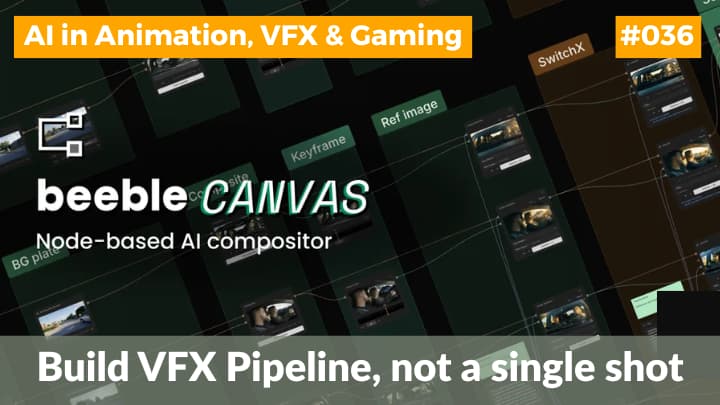
Beeble has launched Canvas, a node-based AI compositing system. It is designed for VFX, post-production, and virtual production teams that need both speed and control. The platform brings AI generation, rotoscoping, relighting, compositing tools, and workflow automation into one graph-based environment. So, artists can build reusable pipelines instead of creting the same setup for every shot.
Benefits of Canvas in VFX pipeline
The biggest appeal of Canvas is that it treats AI as part of the compositing pipeline rather than as a separate, one-click novelty tool. That matters because professional VFX work depends on the ability to revise a shot without losing earlier decisions. A node graph makes every step editable, which is exactly why this format has remained popular in high-end post-production for so long.
Canvas is also clearly aimed at workflow efficiency. Beeble says users can generate and compare variations, batch process shots, and reuse node graphs across sequences without rebuilding the logic each time.
In a nut shell, it means a compositor can spend less time on repetitive setup work and more time on creative decisions and shot finishing.
Major features of Canvas
Canvas combines Beeble’s own production tools with external AI models inside one system. Its native stack includes:
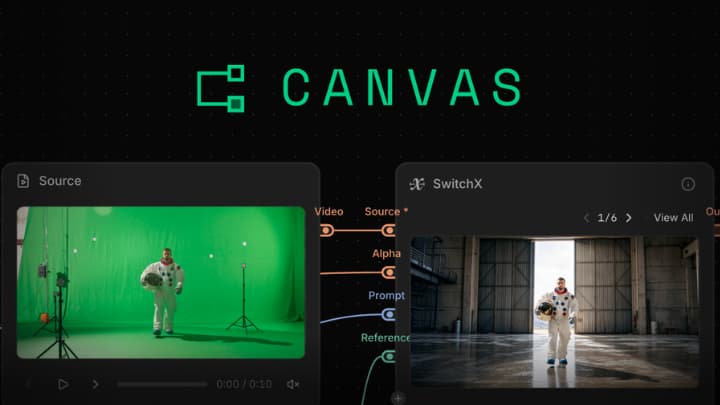
- SwitchX for video-to-video transformation
- SwitchLight for generating physically based rendering passes
- AI rotoscoping tools such as MatAnyone and Corridor Key
It also supports outside models like Seedance, Kling, Nano Banana, Depth Anything, and Qwen, which gives artists more flexibility without forcing them to jump between applications
The system is built around a visual node graph. The documentation shows familiar compositing functions such as layered blending, masks, drawing tools, trim, crop, resize, curves, morphology, viewer controls, side-by-side compare, and export. That makes Canvas feel less like a toy AI editor and more like a serious production interface.
It is designed so that AI-generated elements, real footage, matte work, reference images, and corrections can all live in the same pipeline.
How Canvas works?
A typical Canvas workflow could start with a live-action plate, then branch into AI roto, background replacement, relighting, and final comp inside the same graph. Because each step stays visible, an artist can test multiple versions of a shot without flattening the work or losing the logic behind the result. It is the same post production workflow like Foundry Nuke and Blackmagic Design Fusion.
Such system is especially useful when a director asks for revisions late in the process, which happens constantly in real production.
Another key point is repeatability. Beeble says Canvas is built so artists can create a workflow once and apply it across multiple shots or even an entire sequence. It is like a macro, gizmo or capsule.
Batch iteration is important because AI often creates useful variations, but production teams need those variations across many clips, not just a single demo frame. In that sense, Canvas is trying to solve the messy part of AI adoption: turning isolated outputs into scalable pipeline work.
Case studies of Canvas
Imagine a sci-fi film that has a complex corridor scene with reflections, smoke, and changing light sources. The compositor could use Canvas for the following things without leaving this application:
- Roto the actor
- Do required tracking
- Paint / removal of unncessary objects
- Generate PBR passes for relighting
- Adjust the look of the hallway without rebuilding the shot from scratch every time the lighting direction changes.
That saves both time and cleanup effort, especially when the same visual treatment has to be applied to multiple takes.
Now think about a TV episode with a green-screen dialogue sequence. In a traditional workflow, the team might separate keying, cleanup, background integration, and final color correction across different tools. With Canvas, those steps can be kept in a single graph, making it easier to compare versions, fix problem edges, and reuse the setup on the rest of the episode.
You can call it a batch processing.
A motion design studio could also use Canvas to create variations of an ad campaign shot. For example, one commercial master could be adapted into multiple versions with different backgrounds, product placements, or mood lighting for social media, OTT, and regional edits. Instead of manually repeating the process, the team can branch the graph and batch the output, which is exactly where AI becomes financially meaningful in production.
Production value
This launch is important because it reflects a bigger shift in the industry: AI is moving from experimental generation into structured production workflows. Studios do not just want fast results. They want predictable results that can be reviewed, revised, and handed off cleanly between departments. Canvas is the solution for all such client requirements.
It also shows how compositing tools are evolving. Older workflows often force artists to switch between a compositor, a roto tool, a relighting system, and an AI generator. Canvas tries to collapse those steps into one environment, which can reduce friction in collaborative teams. It also help smaller studios work with a more modern toolkit.
All these are especially valuable in markets where teams need high output but have limited time and manpower.
Canvas in the 3D and VFX pipeline
For VFX artists, the immediate benefit is not replacing craft but reducing repetitive labor.
Cleanup, masking, pass generation, and shot iteration can consume a huge amount of time. Even small savings per shot become significant across an entire project. If Canvas performs reliably, it could become useful for everything from feature films and streaming shows to music videos, ads, and virtual production workflows.
The broader use is that compositing may become more modular and more intelligent at the same time. Artists will judge aesthetics, continuity, and realism. At the same time, AI can take over more of the mechanical work behind those decisions. That combination is where the real value lies. Not just faster output, but a pipeline that gives teams more room to create.
Conclusion
Beeble Canvas is a strong signal that Beeble wants to move beyond isolated AI effects and into full creative infrastructure. By packaging AI models, rotoscoping, relighting, compositing, and automation into a single node-based system, it is creting the powerful post production pipeline. Such advanced VFX workflow executes work faster without making it less controllable.
If the platform continues to mature, it could become especially useful for teams that handle lots of revisions, multiple shot versions, and mixed AI-traditional pipelines. In that sense, Canvas is not just another AI launch; it is part of the ongoing redesign of how visual effects are planned, built, and delivered.