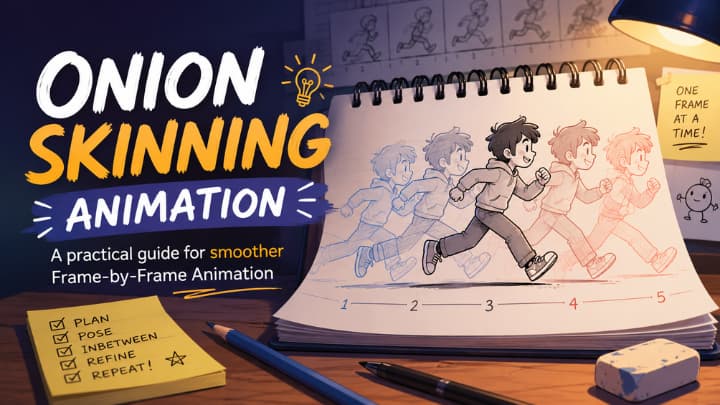
Onion skinning animation is one of those techniques that looks simple on the surface but changes everything once you start animating seriously. It lets animators see nearby frames as faint overlays while drawing the current frame, which makes it easier to control motion, spacing, and continuity.
If you have ever watched a character walk across the screen and felt that the motion looked natural, there is a good chance onion skinning helped make that possible. It is not just a beginner feature or a hidden software setting. It is a workflow tool that supports the entire animation process, from rough blocking to polished in-betweens.
What is onion skinning animation?
Onion skinning is a frame-by-frame animation technique that overlays previous and next frames with reduced opacity. It helps an animator to compare them while drawing the current frame. The idea comes from the layered look of an onion, where each transparent layer helps you see the one before it. That comparison is important because animation is not about drawing one perfect image, it is about drawing a sequence of images that feel connected.
In a tutorial from Animation Desk, the explanation is very practical: “the opacity onion skin shows the frame sequences with different opacity,” and the software even shows previous frames in green and next frames in red.
That color coding matters because it reduces visual confusion. It helps the artist focus on motion instead of guessing where the character should land. In other words, onion skinning turns animation from a memory task into a visual problem-solving task.
Benefits of onion skinning animation
The biggest reason animators use onion skinning is consistency. When you are drawing one frame at a time, it is easy for the head to drift, the arm to shrink, or the spacing to become uneven across the sequence. Onion skinning makes those problems visible before they become expensive to fix.
It also helps with timing, which is one of the most overlooked parts of animation. A pose can be drawn beautifully and still fail if it moves too quickly or too slowly from one frame to the next. Onion skinning lets you judge how much movement is happening between frames, so you can make the action feel snappy, smooth, heavy, or soft depending on the scene.
There is another advantage that often goes unnoticed: confidence. Beginners often hesitate because they are not sure whether the drawing they are making matches the motion they intended.
How digital onion skinning works?
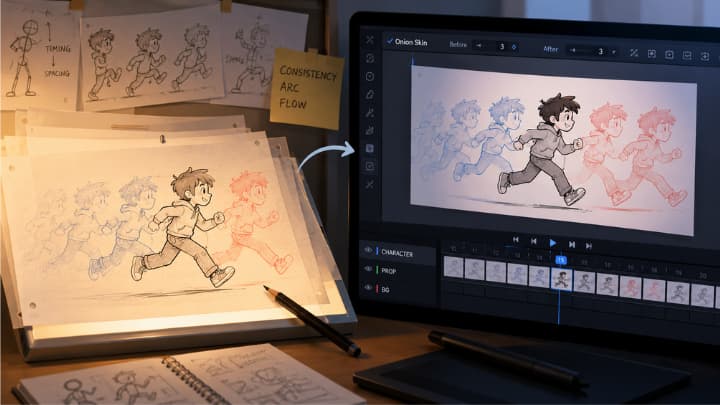
Modern animation software usually includes onion skinning as a built-in feature that can be turned on in the timeline or settings panel. Once enabled, the software displays surrounding frames as faint images while the current frame stays fully visible. Some tools allow the animator to control how many frames appear before and after the current one, which is useful when working on different styles of animation.
Brush Ninja explains that onion skinning can overlay the previous and next frames on the current frame, making movement easier to compare across time. Another tutorial shows that animation software may let you extend onion skinning across the whole scene or limit it to a single layer, depending on the workflow. That flexibility is important because a background layer, a character layer, and a prop layer may all need different amounts of visual guidance.
This is where onion skinning becomes more than a convenience. It becomes part of animation direction itself. The animator can compare pose changes, correct arcs, and keep proportions under control while still moving quickly. In professional work, that speed matters because even a few seconds saved on each shot can become a major time saver across a full production.
Traditional roots and modern value
One reason onion skinning remains so useful is that it evolved from a technique animators already trusted long before digital tools existed. Artists once worked on transparent sheets over a lightbox so they could see previous drawings and refine the next ones accurately. Disney artists were masters at this art.
The digital version simply automates that same visual logic.
That history matters because it explains why onion skinning is not a gimmick. It is a digital answer to a very old production problem: how do you create fluid motion while keeping drawings consistent from one frame to another? The answer, in both traditional and digital form, is to let the animator compare layers of motion instead of working blind.
A lot of beginners think onion skinning is only for clean-up, but that is not true. It is equally useful during rough animation because it helps establish motion paths early. If the rough movement is weak, the final animation rarely becomes strong by accident.
Common mistakes to avoid
- The first mistake is relying on onion skinning without understanding motion fundamentals. The tool can show you the frames, but it cannot decide whether the pose is strong or whether the movement has believable weight. If the keyframes are weak, onion skinning only makes the weakness easier to see.
- The second mistake is showing too many frames at once. While more frames can help in some scenes, too many overlays can clutter the screen and make it harder to focus. A clean onion skin setup is often better than an overloaded one.
- The third mistake is forgetting that animation is about decisions, not just drawing. Onion skinning helps you compare, but the animator still has to choose spacing, timing, and easing. That is why experienced artists use it as a guide rather than a crutch.
All these matters a lot for Animation learners and 2D/3D artists.
If you are learning animation, onion skinning teaches more than just software control. It trains your eye to see how movement changes across frames, which is one of the core skills in 2D animation. Once you understand that, even simple animations start to look more deliberate and professional.
It also helps you develop a better sense of planning. Instead of drawing randomly and hoping the motion works, you begin checking how one drawing leads into the next. That habit is valuable whether you are working on a bouncing ball, a character turn, or a complex acting shot.
Conclusion
Onion skinning animation is one of the clearest examples of how a simple feature can dramatically improve a creative workflow. It helps animators to make a fluid animation. More importantly, it teaches you to think like an animator: not in isolated drawings, but in connected movement.
That is why onion skinning remains relevant in modern age. It is practical and visual approach.