
QuickMagic is a low threshold and high precision AI motion capture product. There is no need for professional equipment and venues, only need to upload video to generate motion data applicable to 3D models. The generated 3D data supports various formats such as FBX, MIXAMO, BIP, UE, etc., and is compatible with mainstream software such as Unity, Blender, Maya and Unreal Engine.
It supports multi dimensional Capture, as it can do full body, half body, facial expression and hand movement capture.
In this exclusive interview, learn all you need to know about QuickMagic, the AI mocap tool.
1. What fundamental problem in animation did you set out to solve, and why does it matter?
The core problem we aim to solve is the efficiency gap and realism disconnect in motion capture. In traditional animation production, professional motion capture requires expensive equipment, complex venues, and significant manpower, making it inaccessible to small and medium-sized teams. Meanwhile, manual keyframing often results in stiff movements and lost details.
This issue matters because movement is the soul carrier of animation. Whether it’s a character’s emotions or the tension of a storyline, they all rely on natural, lifelike movements to resonate with audiences. If movement creation is constrained by cost and technical barriers, the animation industry loses a wealth of diverse perspectives.
After all, great stories shouldn’t only be told by those with access to high end tools. We want to make moving audiences with authentic motion a possibility for everyone.
2. How does AI motion capture technology actually work? Break it down for someone who’s never seen it before.
Think of it as ‘letting AI be your digital motion translator’ – it breaks down into three simple steps:
1. Seeing the frames
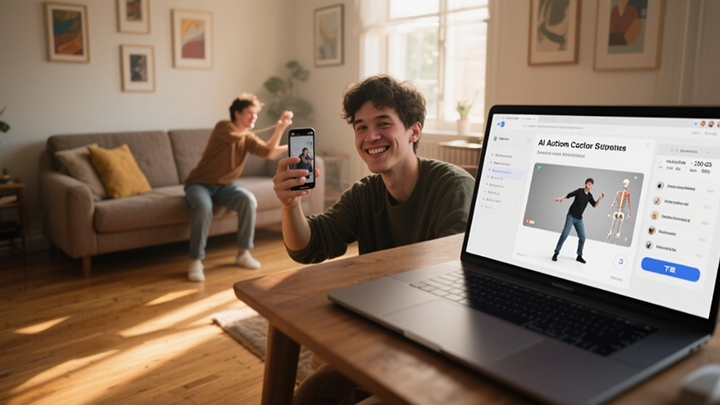
You shoot a 2D video of a person (e.g., waving, walking) with your phone. AI scans each frame to identify the human outline and joint positions (such as shoulders, elbows, knees), even subtle details like finger curvature or body tilt – like placing invisible coordinate tags on the person in the video.
2. Understanding movement
AI analyzes consecutive frames to track how these joints move. For example, if a hand is at chest level in one frame and above the head in the next, AI calculates the arm’s trajectory, speed changes, and even the ebb and flow of muscle force. it’s like taking notes to decode the movement’s logic from the 2D frames.
3. Converting to 3D data
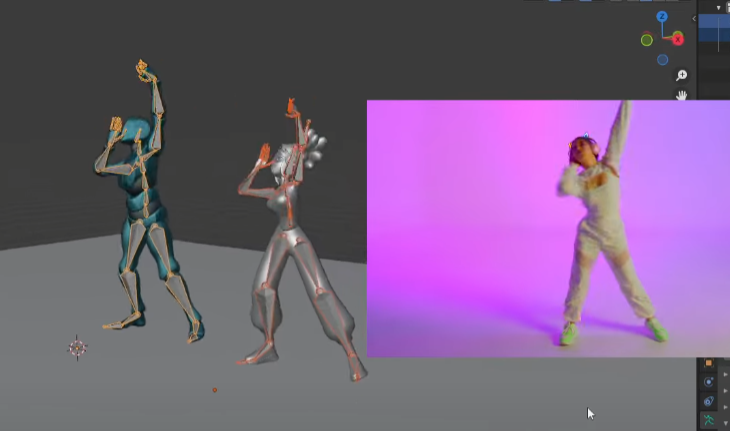
Finally, AI translates these movement notes into 3D motion data readable by animation software. It might calculate, “The right hand moves 50cm upward in 3D space while the wrist rotates 30 degrees,” generating a bone-structured motion file that can be directly imported into tools like Blender or Maya, making 3D characters replicate the movements in the video.
Simply put, it uses AI to turn phone-shot real-person videos into 3D character ready movements. No sensors or professional studios required.
3. What’s QuickMagic’s philosophy on AI augmenting human creativity versus replacing it in animation?
Quick Magic’s philosophy is clear: AI cannot replace VFX artists, it empowers them for enhancements.
For example, if an animator wants a character to show nervousness masked by composure, AI can generate 10 subtle hand movements (like unconscious finger curling or fidgeting behind the back). But decisions like which movement best fits the character’s personality or when to place it in the storyline to resonate with audiences ultimately depend on the animator’s judgment.
It’s much like a paintbrush eases a painter’s work, but the core of what to paint and how remains in human hands.
AI motion capturing frees creators from repetitive tasks (e.g., adjusting a walk cycle’s center of gravity frame by frame), allowing them to focus on the emotion behind movements and the uniqueness of characters. True creativity is never about completing a movement but making the movement meaningful. This is something AI can never replace.
4. What are the biggest technical challenges in translating 2D video into accurate 3D motion, and how do you solve them?
The biggest challenges of AI motion tracking stem from the inherent limitations of 2D to 3D conversion:
1. Depth ambiguity
2D videos lack distance and perspective information. For instance, a hand reaching forward in a frame could mean reaching toward the camera or toward the body’s left. It is similar to how you can’t tell which is closer between a distant tree and a nearby person in a photo.
Our solution is to train AI on massive datasets: millions of pairs of 2D videos + 3D motion capture data for the same action (e.g., recording both a video and professional 3D trajectory of someone raising their hand). This allows AI to learn to infer – using shoulder rotation, elbow bend, and other cues to deduce the most likely spatial position of the hand, with accuracy exceeding 90%.
2. Loss of details
The realism of human movement lies in subtleties: the pressure of a thumb on an index finger when gripping, or whether the heel or toe touches first while walking. 2D video pixels often blur these details.
We developed a micro movement capture module. AI tracks tiny pixel shifts (e.g., skin folds at finger joints) and uses the physics of human movement (e.g., muscle-joint coordination) to restore compressed details. For hand movements, it can identify 21 sub-joints across 5 fingers, even capturing slight nail tilts.
5. How are you democratizing AI motion capture software that was once only available to big studios?
We have taken three steps to break down the barriers.
We have eliminated the need for traditional motion capture gear like reflective markers or inertial sensors. You can shoot with a phone in any setting – indoor, outdoor, sunny, or dimly lit. Don’t worry, AI will process it. It’s like turning motion capture equipment into something everyone carries in their pocket.
Traditional motion capture requires professionals to adjust equipment, delete faulty frames, and rig bones – a process that takes a team all day. Our AI handles all this automatically: after uploading a video, it deletes blurry frames, repairs occluded joints (e.g., an arm hidden during a turn), and even adapts to the bone structures of different 3D models (cartoon or realistic characters, across software like Unreal, Unity, Maya, Blender, 3Ds Max, Motionbuilder, iClone, MMD, Mixamo, and C4D). Users just review the result and click download – the entire process takes 5 minutes.
Big studios spend thousands to tens of thousands of dollars for 1 minute of professional motion capture (including equipment rental, venue setup, and post-processing). With our AI mocap software, 1 minute of motion capture costs less than 1/1000 of traditional methods. We even offer monthly free quotas for students and independent creators, ensuring lack of money never blocks great ideas.
Try QuickMagic AI Motion Capture for Free
Ready to test AI-powered motion capture yourself?
You will get free 60 V coins, which is enough to process several motion capture sessions and explore the platform’s core features.
6. What creative applications of your AI motion tracking have surprised you the most?
The most unexpected are cross-industry uses beyond animation, especially from overseas creators:
A 3-person indie game team uses it for rapid prototyping with no professional motion capture skills. They film their programmer acting out combat moves (sword swings, dodges). AI generates in-game character motions in real time, allowing them to test gameplay the same day. What once took two weeks with manual keyframing now takes two days to iterate on 5 styles, earning them a nomination at an indie game showcase.
Overseas VTuber teams use our technology for ‘equipment free streaming’. Streamers film themselves at home with a phone, and AI syncs eyebrow raises, hand gestures, and other small movements to 3D avatars in real time, with latency under 0.3 seconds. Compared to traditional sensor-based setups, costs are reduced by 90%, and they can stream in any location (e.g., outdoors while interacting with avatars). It’s now a staple for small VTuber teams.
Most surprisingly, edtech companies use this AI motion tracking for immersive science lessons. Students film their hand gestures simulating molecular movement, and AI converts these into 3D animations, letting them see how their gestures affect molecular arrangements. Teachers report a 40% increase in middle school classroom engagement, proving motion capture can make knowledge tangible, not just entertaining.
7. How do QuickMagic balance accuracy with accessibility in your AI motion capture software?
The core logic is that AI mocap handles all complexity, while the 3D and VFX artists focus only on whether the result works or not. It is a continuous improvement through two-way feedback.
Technically, AI leads the entire process. After uploading a video, the system automatically completes joint recognition, trajectory calculation, and 3D reconstruction, directly outputting usable motion data. No need for users to switch modes. AI adapts calculation precision to movement types (everyday actions or complex dances).
For high-dynamic movements like quick punches, it increases frame analysis frequency to capture force details.
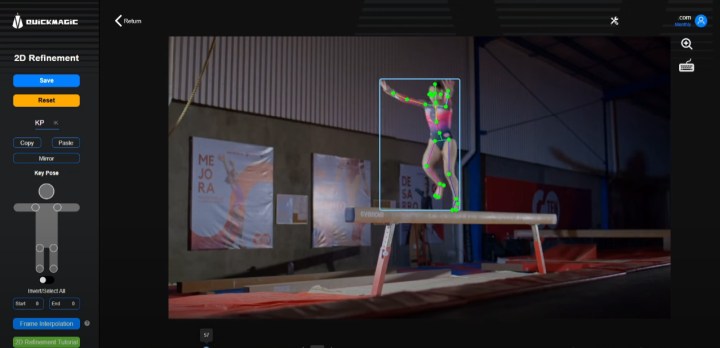
We have also designed intuitive correction + feedback loops. A dedicated tool lets users easily fix errors. If AI mislabels a joint (e.g., misplacing an elbow), users drag the marker to the correct position on the 2D video without needing bone expertise. For details like foot-ground contact (critical for realism), the tool uses color coding: red for “foot on the ground and stationary,” green for “foot off the ground or moving.” Users simply click to switch colors, the operation is as easy as selecting icons.
A rating system lets users score results. We prioritize low scores: replying to users with tips (e.g., avoid backlighting or wear contrasting colors for better joint detection) and iterating algorithms with these cases. This user feedback technology iteration loop keeps the system simple to use while improving accuracy over time.
8. What advice would you give to independent animators and creators who want to incorporate motion capture into their work?
Leveraging our monocular capture strengths, here are 3 practical tips to overcome inability to film desired movements while using our AI motion tracking software.
1. Blend self-shot and online footage
Monocular capture works with any video source – you can film your own everyday actions (e.g., a character’s small emotions, daily gestures) since you know the details best, and also use online footage (e.g., dance tutorials, movie clips). Even screen recorded videos are processed accurately.
One creator combined their own angry fist footage with an online turning clip to create a character performance that perfectly fits the story, doubling efficiency.
2. Treat AI motion capture results as drafts and add your touch with tools
AI-generated movements are solid bases, but use our correction tools to make them unique. If online footage has overly large movements, fix joint positions with 2D correction; if foot-ground contact feels off, adjust with IK contact point color coding. These are far simpler than manual keyframing but instantly add your creative mark, great animation’s soul lies not in perfect movements but intentional ones.
3. Monocular capture of AI mocap lets you iterate freely
No need for professional equipment, reshoot bad takes or swap footage at almost no cost. Mix styles boldly: use ballet footage for a cartoon character’s lightness, or hip-hop clips for a robot’s mechanical moves. The tool exists to let you play freely, great ideas often come from trial and error.
9. How do you see the animation pipeline evolving as AI tools become more sophisticated?
It will shift from tool assisted creation to natural interaction driven creation.
Future AI motion capture software won’t be limited to video-to-motion. It will support direct creation via text, voice, or even sketches. For example, inputting text like “A person walks 4 steps, sprints, takes a 3-step layup, scores, cheers, then does a backflip”—AI will instantly parse movement logic (step length, force rhythm, limb coordination) to generate coherent 3D motion.
Even speaking “Make the character turn slowly with a hesitant expression”—voice recognition combined with emotion analysis will sync matching limb and facial movements. This what-you-imagine-is-what-you-get real time generation will reduce the idea to execution gap to seconds. As natural as typing, letting animators avoid workflow interruptions.
Modularity will advance from manual assembly to AI auto-combination and learning. The system will accumulate massive user-generated motion data (e.g., limping walks, sly smiles) into a module library. When you use a layup module, AI adapts to your usual character proportions (exaggerated limbs for cartoons, physical inertia for realism) and even predicts adjustments based on your habits (e.g., adding slight shakes to jumps if you often do that).
Creators can share modules. As an example. your optimized backflip can be adapted for more character types, benefiting the entire community.
Lower barriers will welcome non professionals also. Teachers making educational animations, farmers filming rural stories and so on. Styles will go beyond Disney-like or anime-like to include diverse, life-filled expressions. Animation’s essence is storytelling, not showcasing technology.
10. What fundamental principles guide your approach to developing AI mocap for creative applications?
When you use QuickMagic, you own their creative direction, with clear data rights. All motion data generated via our technology is user owned. We provide technical support without interfering with creative expression, ensuring the tool remains a creative assistant, never a data controller.
We follow the policy of zero barrier intervention. Users can optimize AI-generated motion data without professional knowledge, through simple, intuitive tools. Whether correcting recognition errors or adjusting details, the operation is as easy as clicking and dragging on a picture. The final result is fully controlled by the user. Technology should make professional level adjustments accessible to everyone, not block people with complexity.
We never aim for AI-generated perfect movements. Instead, we intentionally leave room for personalized adjustments. Algorithms can provide high quality base motions, but the power to make movements fit a character’s personality or match a story’s mood always lies with creators. True creativity is never an algorithmic correct answer, but a unique expression with the creator’s touch.
11. How do you handle the nuances of human movement—the subtle details that make animation feel authentic?
QuickMagic has built a three layer detail AI motion capture technology. It focuses on on everyday actions, dance, and performances:
The basic layer do tracking of 25 core joints to ensure logical bone movement in daily gestures, dance steps, and performance limb swings. It is the foundation for believable movement.
The advanced layer can capture 16 hand keypoints + 52 facial expression points. It takes care of recording details like finger curl during a handshake, eyebrow rises while speaking, and wrist flicks in dance and many more such. These details determine a character’s credibility.
The third and final is the emotional layer. We have trained AI to recognize emotional codes in movement. For example, impatient waving vs. gentle greeting differ in arm speed and finger orientation. We extract these emotional feature parameters from professional actors’ performance data.
Together, these layers make movement not just motion but emotional expression.
12. What role should traditional animation skills play in an AI powered future?
Traditional animation skills will not be replaced, instead they will become like creative anchors.
AI mocap can generate smooth movements, but decisions like whether a character frowns or clenches a fist first when angry or if a shy character walks with their head down require an animator’s understanding of human nature. AI can’t replicate it.
The duration of a AI motion tracking movement (1 second vs. 3 seconds) directly affects audience perception (e.g., slow motion amplifies tension). This ability to control a story’s pace through movement comes from traditional training in storyboarding and performance, an artistic judgment no technology can automate.
Just as some prefer the brushstroke texture of hand-drawn animation, future creators may intentionally preserve hand adjusted movement details to counter AI’s mechanical perfection. The core of traditional skills is never being accurate but understanding why to do it that way, and that’s irreplaceable.
13. How do you measure success when you’re working at the intersection of technology and artistry?
We use two non technical metrics.
The first is who is using it. Success isn’t just professional animators using the tool – it’s when a teacher with no animation background or a small studio illustrator creates a short film that moves audiences to tears. This proves technology has truly broken barriers, letting more people speak through creativity.
The second is human touch in the final output. If a character’s movements are smooth but robot like, technology has only solved making them move. But if the movements convey hesitation, excitement, or shyness, we had won the game. Such details that make audiences think this character is just like me.
Success isn’t about how advanced the technology is but how freely and authentically it lets art express itself.
14. What’s the most important thing you have learned about human movement through developing this technology?
The most profound insight that QuickMagic’s team learned: Every human movement is an unspoken word.
Analyzing tens of thousands of daily movement videos revealed that even standing still varies: confident people stand with chests out, weight on their forefeet; anxious people hunch, shifting weight between feet. These movements hold clues to personality, emotion, and even life experience, like a body language code.
This taught us motion capture’s ultimate goal isn’t copying trajectories but translating this code. Capturing an elderly person’s knees slightly bent, small steps isn’t just recording movement. It conveys the weight of years. Capturing a child’s arms swinging wildly while running conveys carefree vitality.
Technology’s final role is to let animated characters speak too, communicating silently with audiences through movement.
15. If you could solve one major challenge in animation with AI, what would it be and why?
We would choose cross style motion generation which enables AI motion tracking to automatically adjust a movement’s trait based on animation style.
For example, the same arm raise needs light bounce for anime (with slightly exaggerated joint movement), solid weight for Western animation (with subtle shoulder sinking), or jerky mechanics for stop motion (with larger frame-to-frame shifts). Currently, creators either manually adjust hundreds of keyframes or hunt for style matching reference videos, which leads to wasting time.
If AI could understand style codes, it would shatter style realization barriers. Creators could focus on what story to tell instead of how to achieve the style.
Try QuickMagic AI Motion Capture for Free
Ready to test AI-powered motion capture yourself?
You will get free 60 V coins, which is enough to process several motion capture sessions and explore the platform’s core features.